





Web workspace
Manage websites, knowledge, assistant settings, conversations and billing in your browser.
Your full workspaceKeep customer conversations close. Choose the web workspace, a browser side panel, Telegram or your Android phone, and work with the assistant connected to your business.
Use your AiRep24 account. Features and access follow your service plan and permissions.
Each interface has a clear job. Start with the web workspace, then add the tools you need.
Manage websites, knowledge, assistant settings, conversations and billing in your browser.
Your full workspaceRead conversations and reply in the side panel. Review selected page text and save it to the right assistant’s knowledge.
Desktop browser extensionsKeep the signed-in web workspace tab open while using the extension. Interface in English.
Receive operator notifications and reply to customers through your connected Telegram setup. Operator access depends on your plan.
For connected operatorsRead customer conversations, send replies and pause or resume AI from your phone. Review connected sites and their status.
Available on Google Play · English interfaceAiRep24 for iPhone and iPad is on its way. We’ll add the App Store link here when it is available.
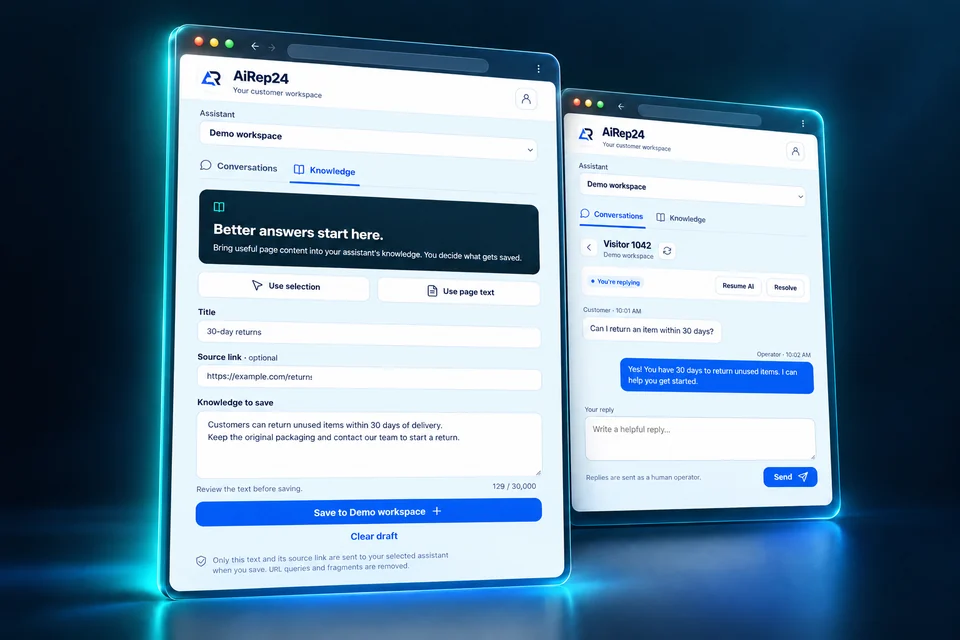
Let your assistant handle routine questions. When you choose to join, read the context and reply. From the browser extension, review useful page text before saving it for future answers.
Open the web workspace and sign in to your AiRep24 account. New here? Preview your website before choosing a paid plan.
Install from an official store, or connect Telegram from the workspace. Browser extensions need the signed-in console tab to stay open.
Select the correct business or assistant, review its conversations and use the actions available to your account.
No. The browser companion uses your existing AiRep24 account and service plan. Installing it does not create a separate extension subscription or increase your plan limits.
Each interface supports different tasks. Use the web workspace for full configuration and billing. The browser extensions focus on conversations and reviewed knowledge capture; Telegram and Android support the operator actions described above.
The open browser panel refreshes every 20 seconds. It does not send alerts while closed. Configure Telegram operator notifications separately if your plan includes them.
Page capture starts when you request it. Review and edit the draft before saving. Form fields, passwords and hidden content are excluded; URL query strings and fragments are removed.
Use the Android app or the web workspace. Chrome and Edge companions are for desktop browsers. The iOS app is coming soon. The browser companions and Android interface are currently in English.
Preview up to five public pages without an account or payment card. Then create your workspace and choose how you want to manage it.